
The Maastricht University | MUMC+ Research Information portal showcases UM’s research output and strengthens your individual and faculty-wide scientific and societal impact.
Keeping your researcher profile in Pure up to date will also increase your visibility to collaborators, funders, and the scientific community.
Start updating your researcher profile
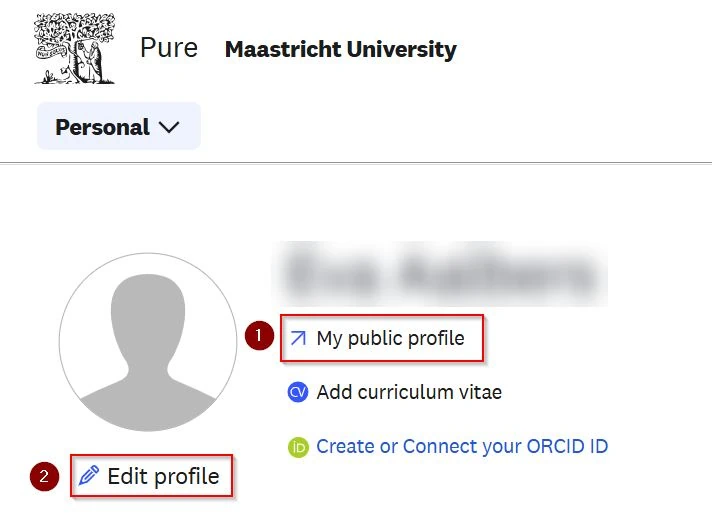
After logging in to Pure:
- go to your online profile in the Research Information portal
- start editing your profile in Pure
Create or Connect your ORCID
ORCiD stands for Open Researcher and Contributer iD: A persistent digital identifier for anyone working in academia.
ORCiD is a unique personal number that allows researchers to easily and automatically connect their research information across a wide range of online databases.
Visit the library webpage dedicated to ORCID and follow the steps to register and authenticate your ORCID in Pure.
Add your profile photo
Make yourself known and upload a recent portrait photo.
Click ‘Add image’ under Profile photos

Browse and select the picture and make sure Portrait is selected under Category, otherwise the photo will not be shown in your online profile.
You can always replace the portrait photo.
Check and add your name variants
Your default names in Pure are synchronised with the Maastricht University HR-system. If these are incorrect, go to Successfactors to request a change.
Adding name variants to Pure will improve relating imported publications to your personal profile. Advised is to set the following name variants:
- Known as name: your name as it is shown in the Research Information portal.
- Default publishing name: the name you use in your publications
Add links to other professional profile sites
Your Maastricht University Personal Profile Page (PPP) is automatically synchronised with the UM HR system.
You can also add links to other professional profile sites, such as LinkedIn, Research Gate or personal website.
Click Add link

Type the URL in the Web address field.
Add a description . This will be shown in the Portal when the mouse pointer hovers over the link.
Select the link type so Pure will know which icon to use.
Add your curriculum and research description
Add a brief description of your professional identity in which you can promote your research and other achievements.
Scroll down to Curriculum and research description and click the ‘Add profile information’ button

Under Type, you can choose en fill in 3 topics: Biography, Research Interests and Teaching Interests.
Guide per topic:
Biography
- Introduce yourself and describe your professional situation by giving your name, degree(s), and current institutional affiliation.
- While describing your research, keep in mind you don’t only write for your peers, but also for a broader audience, for example journalists. Use interesting key words they would be looking for and keep the language understandable for the public.
- Also describe the societal impact of your research and teaching if applicable.
- Mention professional affiliations, professional licenses, or involvement with national organizations. For example chairing a committee.
- Are you a junior researcher? Focus on your more recent accomplishments.
Research Interests
- First write down your main areas of focus / your expertise. And then communicate any accomplishments regarding these topics, especially if you’re the first researcher to develop a program or study an issue.
- Are you a senior researcher? Promote your experience and describe your research accomplishments. Many will use the phrase ‘best known for’. As in ‘[your name] is best known for his work…’ or ‘[your name] is best known for creating…’. Avoid the use of academic titles (like ‘Prof. Dr.’) in the text; instead mention your substantive assignment, e.g ‘neuropsychologist’.
- Are you more junior? Be more specific about your expertise, interests and the focus of your research.
Teaching Interests
- Use bullets to sum up the subjects you teach. Do not use the name of the course you are teaching here, but name the subject of the course.
- Indicate the educational programmes you’re involved in and what your specialization is. You may also mention external teaching activities.